
Outspell
Play Outspell online for free and challenge the computer in this word game. Choose your difficulty level, arrange letter tiles on the board, and take advantage of special bonus squares to earn more points. With three difficulty settings and a scoring system that rewards careful planning, Outspell offers an enjoyable word challenge for beginners and experienced players.
How to Play Outspell
Choose your difficulty and start building words against the computer.
Select Easy, Medium or Hard depending on how challenging you want the computer opponent to be.
Use the tiles from your rack to build valid words horizontally or vertically on the board.
Look for letter and word multipliers to increase your score with every move.
Confirm your word to score points, exchange difficult tiles, or pass when necessary.
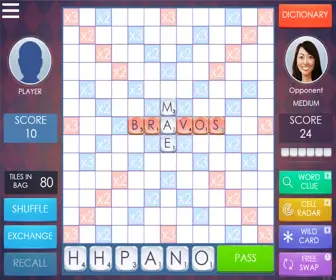
Play Outspell: A Scrabble-Style Word Game
Outspell is a browser-based word game developed by Arkadium that combines familiar letter-tile gameplay with its own board design and scoring rules. If you enjoy Scrabble, you'll recognize the basic challenge: create valid words, place them strategically on the board, and finish with more points than your opponent.
What makes Outspell interesting is the way it rewards careful positioning. The board contains special squares that increase letter or word values, and these bonuses remain active after being used. This creates opportunities to revisit valuable areas throughout a match rather than treating them as one-time rewards.
You play against the computer and can select from three difficulty levels. Whether you're learning the basics or looking for a more demanding opponent, the game gives you room to practice different word-building strategies without arranging a match with another person.
How to Play Outspell Online
Outspell is easy to learn if you've played Scrabble or another letter-tile board game. Follow these five steps to get started:
- Choose a Difficulty Level – Select Easy, Medium or Hard before beginning your match. Start with Easy if you're unfamiliar with the rules.
- Examine Your Letter Rack – You receive seven tiles. Look for useful combinations and consider how your letters might fit on the board.
- Place a Valid Word – Arrange letters horizontally or vertically. The opening word begins at the center, and later moves must connect with existing tiles.
- Use Bonus Squares – Look for spaces that multiply letter or word values. Positioning a word carefully can make a significant difference to your score.
- Confirm Your Move – Submit your word to earn points and let the computer take its turn. You can also exchange letters or pass when needed.
As the board fills up, new opportunities appear around existing words. Try to think about both your current score and the positions you leave available to the computer.
Understanding Outspell's Bonus Squares
Bonus squares play an important role in Outspell. They increase the value of letters or complete words, making some positions much more valuable than others.
- Double Letter – Doubles the value of a letter placed on the square.
- Triple Letter – Triples the value of an individual letter.
- Double Word – Doubles the value of the completed word.
- Triple Word – Triples the total value of a word when activated.
Unlike traditional Scrabble, Outspell keeps its bonus squares active even after they've been used. This means a premium position can remain valuable throughout the match, giving both players an incentive to build around it.
Pay attention to the board before placing a word. A shorter word that reaches a useful multiplier may be worth more than a longer word played across ordinary squares.
Outspell Difficulty Levels: Easy, Medium and Hard
Outspell includes three computer difficulty settings, allowing you to choose how demanding you want each match to be.
- Easy – A good starting point for learning word placement, scoring and the game's controls.
- Medium – Suitable for players who understand the basics and want a more competitive match.
- Hard – A tougher challenge that encourages more careful planning and efficient use of your letters.
If you're new to the game, begin on Easy and concentrate on recognizing useful word patterns. Once you become comfortable with the board, move to Medium or Hard to test your strategy against a stronger opponent.
7 Strategies to Improve Your Outspell Score
Winning at Outspell takes more than knowing long words. Good tile management, awareness of bonus squares and smart positioning can make a major difference. Try these strategies during your next match:
- Control the Premium Squares – Since bonus squares remain active, think carefully about which positions you allow the computer to reach.
- Use High-Value Letters Wisely – Letters such as Q, Z, X and J can earn valuable points when placed on letter multipliers.
- Look for Parallel Words – Placing tiles alongside existing words may create several valid words in a single turn.
- Keep a Balanced Rack – A useful mix of vowels and consonants gives you more options than holding too many of one type.
- Save Blank Tiles for Difficult Situations – A blank can represent another letter, helping you complete a word or reach an important square.
- Think About the Computer's Next Move – Avoid opening a valuable bonus square unless you have a good reason to do so.
- Exchange Tiles When Necessary – If your rack offers very few possibilities, exchanging letters may be better than forcing a weak move.
One of the most useful habits is comparing several possible placements before confirming a word. Sometimes a modest score that protects the board is a better decision than a higher score that gives the computer an easy opportunity.
Why Short Words Matter in Outspell
Long words can be satisfying, but short words are often essential in a competitive match. Two- and three-letter words can help you fit tiles into crowded spaces, connect with existing letters and reach valuable bonus squares.
Learning commonly accepted short words also makes your letter rack more flexible. When the board becomes crowded, a small word placed in the right position may be your best scoring opportunity.
Remember that Outspell uses its own built-in dictionary. A word accepted in another word game may not always be available here, so pay attention to which entries the game recognizes.
Outspell vs. Scrabble: What's Different?
Outspell and traditional Scrabble share several familiar features. Both games involve forming words from letter tiles, placing them on a board and earning points based on letter values and special squares.
However, Outspell has a few characteristics that give it a different feel:
- Reusable Bonus Squares – Outspell keeps premium squares active after they're used, changing how players approach board control.
- Computer Difficulty Settings – Choose between Easy, Medium and Hard to match your experience.
- Browser-Based Gameplay – Start a match without setting up a physical board or arranging tiles.
- Automatic Scoring – The game calculates points and checks submitted words.
- Different Board Strategy – Reusable multipliers make certain areas valuable throughout the game.
If you prefer a more traditional digital Scrabble experience, try Scrabble Online. You can also explore Just Words for another variation on word-building gameplay.
Why Play Outspell Online?
Outspell is a convenient choice for anyone who enjoys vocabulary games that combine word knowledge with strategy. The rules are familiar enough for beginners to understand, while the reusable bonus squares and different difficulty levels give experienced players plenty to consider.
- Instant Word Games – Play directly in your browser without downloading software.
- Adjustable Challenge – Choose the computer difficulty that best matches your experience.
- Vocabulary Exploration – Discover useful words and practice recognizing letter combinations.
- Strategic Gameplay – Plan placements, manage your rack and control valuable areas of the board.
- Flexible Sessions – Enjoy a casual match or spend longer improving your strategy.
Whether you're practicing word placement or simply looking for a relaxing game against the computer, Outspell offers a satisfying combination of vocabulary and tactical decisions.
More Word Games to Explore
If you enjoy Outspell, try Scrabble Online or Just Words for more letter-tile challenges. For something different, Text Twist 2 focuses on finding hidden words from scrambled letters, while Word Wipe offers another style of word puzzle.
Switching between these games can introduce you to different scoring systems, word patterns and ways of approaching vocabulary challenges.
Start Playing Outspell for Free
Ready for a new match? Return to the game above, select your preferred difficulty and begin placing words on the board. Look for useful bonus squares, keep your letter rack balanced and think carefully before giving the computer access to valuable positions.
Play Outspell online for free directly in your browser. Every match is another opportunity to discover words, improve your strategy and see how many points you can earn.
Frequently Asked Questions About Outspell
Is Outspell free to play?
Yes. You can play Outspell for free directly in your browser without downloading or installing the game.
Can I play Outspell against the computer?
Yes. Outspell lets you play against a computer opponent and choose between Easy, Medium and Hard difficulty levels.
How is Outspell different from Scrabble?
Outspell uses familiar word-building mechanics but has its own board and scoring rules. One notable difference is that its bonus squares remain active after being used.
Can I exchange letters in Outspell?
Yes. You can exchange tiles when your letter rack is difficult to use, or pass your turn when you cannot find a suitable move.